
Chapter 14 · 14.4
More storage or users, changing or cancelling your package
Your package grows with you. You arrange more storage, additional users or Office licences yourself on the package page in Mijn WebOké. That's also where you switch to a different package, or cancel your package.
Configurable options
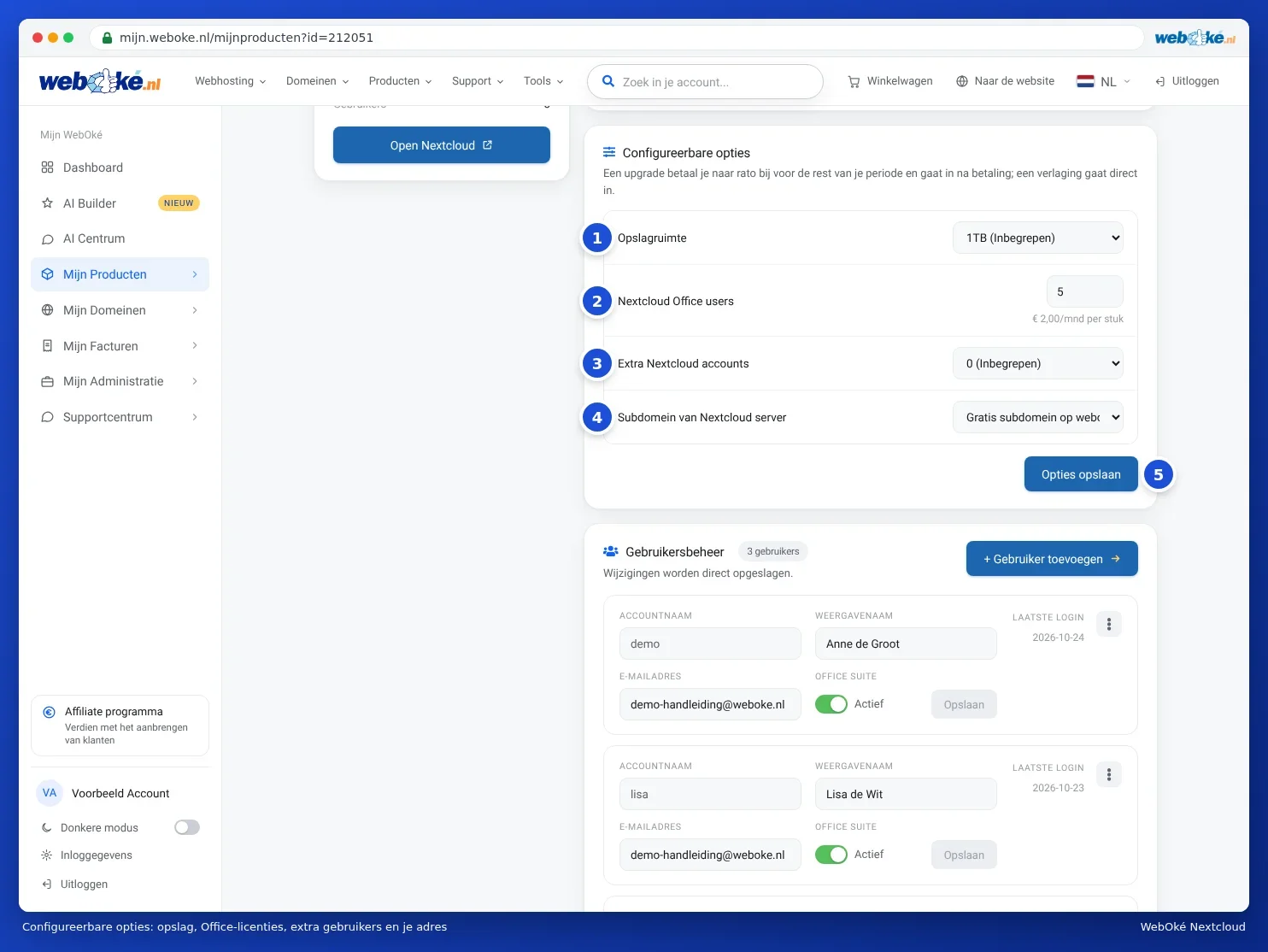
| Option | What you choose | With which package |
|---|---|---|
| Storage space (1) | Personal 250 or 500 GB, Family 500 GB or 1 TB, Max 1, 2 or 5 TB | Personal, Family, Max |
| Nextcloud Office users (2) | The number of Office Suite licences (see Assigning and ordering extra Office licences) | Personal, Family, Max |
| Extra Nextcloud accounts (3) | Extra users on top of the 10 included with Max, up to 100 in total | Max |
| Subdomain of Nextcloud server (4) | The free address on webokecloud.nl or your own subdomain (see Your Nextcloud on your own domain (cloud.yourcompany.com)) | Family, Max |
- Choose what you want for each option.
- Click Save options (5).
- You'll see what you need to pay for the rest of your period, excluding and including VAT.
- Click Confirm and pay and pay the invoice.
You pay pro rata for an upgrade for the rest of your period, and it takes effect after payment. A downgrade takes effect immediately. After a change to your storage, we adjust the storage for all users of your package.
Please note: if you reduce your storage, first check the Storage space counter to see whether your files fit in the smaller storage. You can read what counts towards your storage in Viewing your storage: what counts and what doesn't.
Choosing a different package
On the package page, you'll see the Change hosting package card if a different package is available for you. Choose the new package and click Change package.
- An upgrade, for example from Personal to Family, takes effect immediately. You pay pro rata for the remaining days. You keep your own Nextcloud with all your files.
- A downgrade takes effect at your next renewal. You don't pay anything extra. Make sure your users and files fit in the smaller package.
- More than 5 users with Family? That's only possible with Max.
- Switching from Free to a paid package isn't possible with an upgrade. You order a new package and transfer your data over. See From Nextcloud Free to a paid package, or from another Nextcloud provider.
Cancelling your package
At the bottom of the package page, you'll find the Cancel product card. There you can choose:
- As of the expiry date: your Nextcloud keeps working as normal until that date, and is then automatically terminated. You won't receive any further renewal invoice. As long as the date hasn't passed, you can undo this with Undo cancellation.
- Cancel and delete now: your Nextcloud is deleted immediately, along with all files. The remaining term isn't refunded.
Please note: once terminated, all files, calendars and contacts of all users are gone. First retrieve everything you want to keep: files with the desktop app or as a zip, calendars and contacts as ics and vCard files. See Uploading and downloading, including large files, whole folders and zip and Contacts: creating, groups, importing and exporting.
Is your Nextcloud moving to another WebOké customer, for example because you're selling your company or have a new treasurer? Use Transfer to another customer at the bottom of the package page. Don't cancel in that case: everything stays as it is.