
Chapter 2 · 2.8
Paying: payment methods, bank transfer and credit balance
After placing your order, you'll see the payment screen Choose how you want to pay. At the top, you'll find the amount and the invoice number. Below that, you choose how to pay.
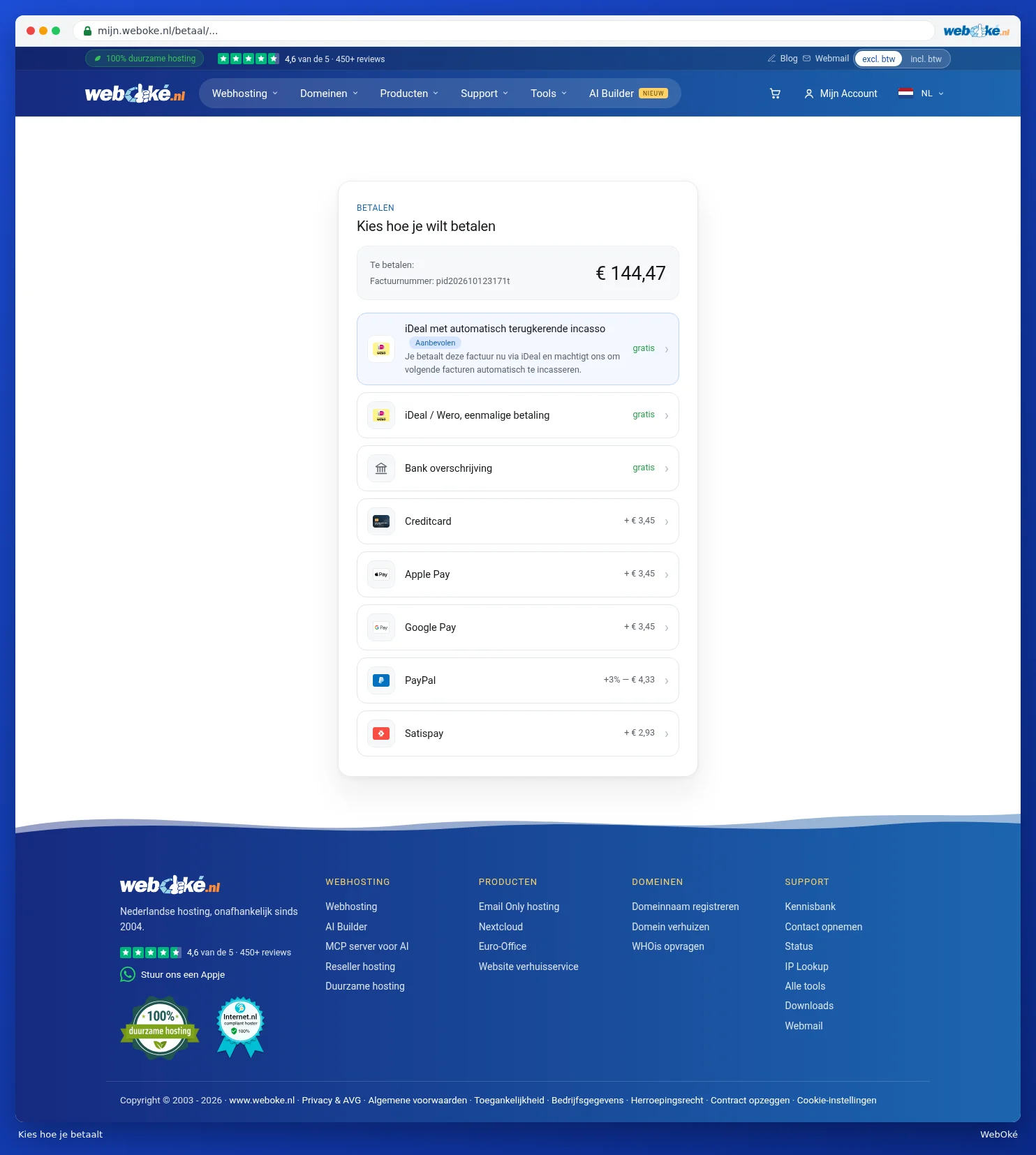
The payment methods
Which payment methods you see depends on your country and your account. Some methods have a small surcharge, shown on the right. If it says free, you don't pay anything extra.
| Method | What happens? |
|---|---|
| Pay with your credit balance | If you have credit in your account, you pay with that first. If your balance isn't enough, you pay the rest with another method. See Credit balance and topping up credit. |
| iDEAL with automatic recurring direct debit | You pay this invoice with iDEAL and authorise us to automatically collect future invoices. That way, you never have to think about your invoices again. See Setting up or stopping direct debit. |
| iDEAL / Wero; one-off payment | You pay only this invoice using your banking app. |
| Bank transfer | You transfer the amount yourself. See below. |
| Credit card, Apple Pay, Google Pay, PayPal and more | You pay via the payment page of our payment partner. |
Click a method. You'll then go to the payment page of your bank or the payment partner. After paying, you'll automatically return to WebOké.
Tip: you'll only see the option iDEAL with automatic recurring direct debit if you're logged in as the account holder. You're automatically logged in as the account holder right after placing an order.
Paying by bank transfer
- Choose Bank transfer.
- You'll see the account details: Account holder, IBAN, BIC, the Amount and the Description. Use Copy to copy a detail. You can also scan the QR code with your banking app.
- Always state the invoice number as the description. That way, we can recognise your payment.
- Click Done, I will transfer the amount.
The invoice remains open until we've received your transfer. You'll then receive a confirmation by email. We'll deliver your order as soon as the payment arrives. Want it to go faster? Choose a method that pays instantly, such as iDEAL.
After paying
If the payment is successful, you'll see Thank you for your payment! If processing takes a moment, you'll see Payment is being processed. This usually takes less than a minute. After that, we'll deliver your order, see After your order: tracking delivery and the welcome email.
Please note: did you cancel the payment, or did it fail? Then the invoice simply remains open. You can still pay it later via My WebOké, under My Invoices. See Paying an invoice (including several at once).