
Delete website and keep only your email
Do you want your website to no longer be online, but you do want to keep your email? Then you have two options: you switch your hosting package to a cheaper email package, or you keep your hosting package and just empty the website folder.
Option 1: switch to an email package yourself
No longer need a website? Then switch your hosting package to an email package yourself. Your mailboxes with all mail remain, as do forwardings, autoresponders, spam filters, DNS, and SSL. Everything related to the website, we remove.
- Log in to My WebOké and go to My Products › Manage next to your hosting package.
- Scroll to Change hosting package. Below that is Or switch to an email package.
- Click the email package you want. You'll immediately see if your mail fits and what it costs.
- Click Switch to email package. In the window you'll see exactly what will be deleted and what remains.
- Check that you understand, type your domain name to confirm, and click Delete everything and switch.
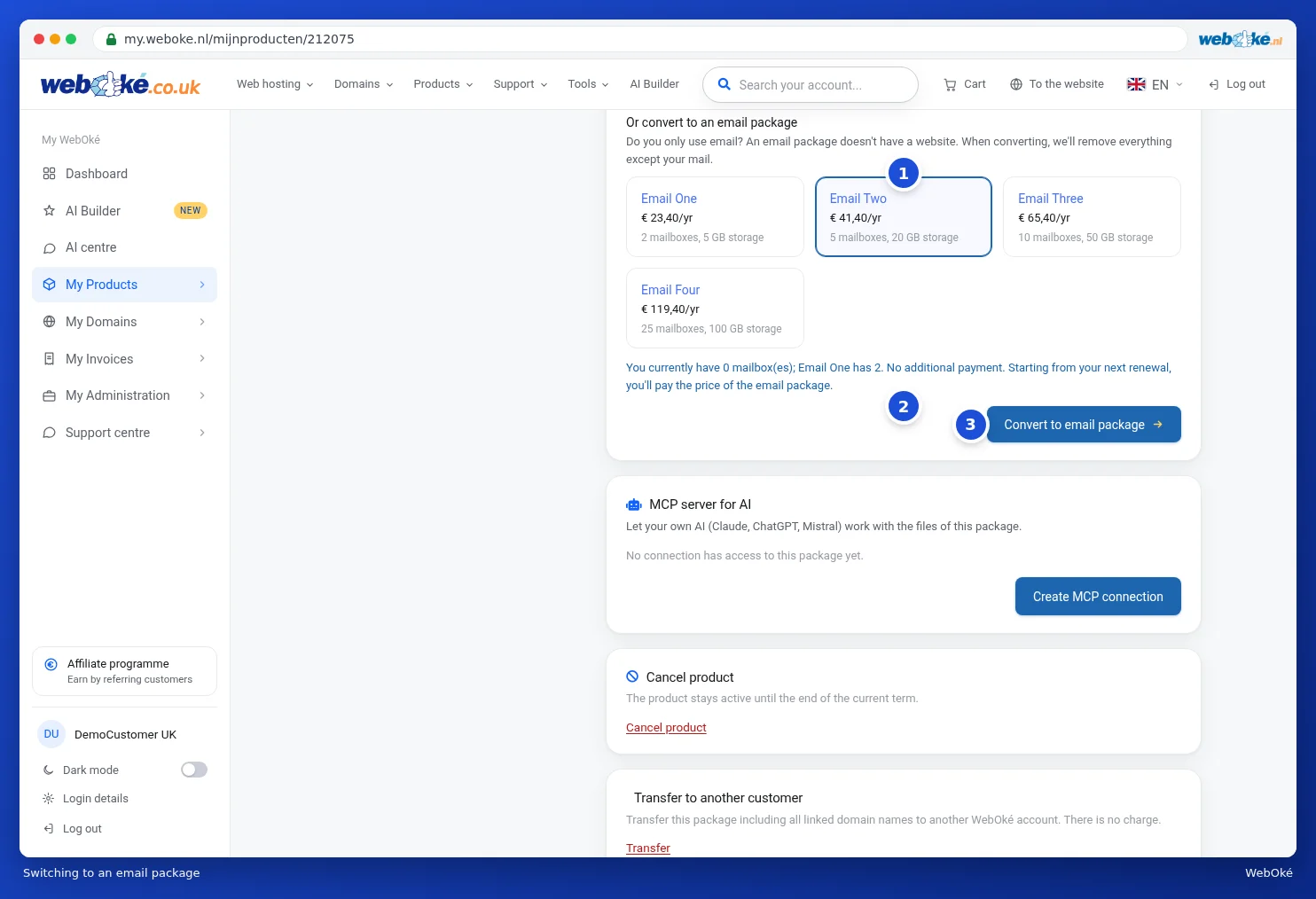
What does it cost? If the email package is cheaper, you pay nothing extra and the price of the email package applies from your next renewal. If it's more expensive, you first pay the difference. Switching is usually done within a few minutes. Only the account owner can switch a package.
When isn't it possible? If you have more mailboxes or more mail than the email package can handle, if there are multiple domains in your package (an email package has one), or if your package has its own IP address. You'll then see a message with what you need to do first.
Option 2: keep your hosting package and empty the website folder
Want to keep your hosting package, for example because you want a website again later? Then just empty the website folder.
- Log in to DirectAdmin and open System Info & Files, File Manager.
- Go to the folder
domains/yourdomain.nl/public_html. - Delete all files and folders in public_html. If the site was installed with Installatron or the Website Manager, it's better to remove it there instead, so the database is removed too.
- Want to show a message, like "This website has been discontinued"? Then create a file
index.htmlin public_html with that text.
Your mailboxes will just keep working.
Don't have a package yet, or is your domain hosted elsewhere?
Want just email on your domain, without a website? Then order an email package (Email Only) via Products › Email packages. If your domain stays with another provider, read Hosting package for a domain that stays with another provider to find out how to set up the DNS and MX records.
Also see in the DirectAdmin manual: Removing an installation and Opening File Manager: the folders in your package.
Detailed explanation with screenshots: Switching your hosting package to an email package in the WebOké manual.